
A Hackathon with a Hidden Agenda
We were about a week ahead of schedule in Tech for Social Good, and I had a Friday. So I did something I almost never do in this class: I gave the kids a problem that had nothing to do with a real person.
One of my students sent me this short. A light sensor taped to a laptop screen watches for the cactus in the Chrome Dino game, and a servo motor taped next to the keyboard whacks the spacebar when it sees one. The dinosaur jumps. Over and over. Nobody touching anything.
I called it a hackathon because that sounded fun. Sixty minutes. Build it, submit the code, wiring diagram, and video, and win a homework pass. All three artifacts together are worth 5 points. The whole thing lives on the Hackathons page of the class hub I wrote about two days ago.
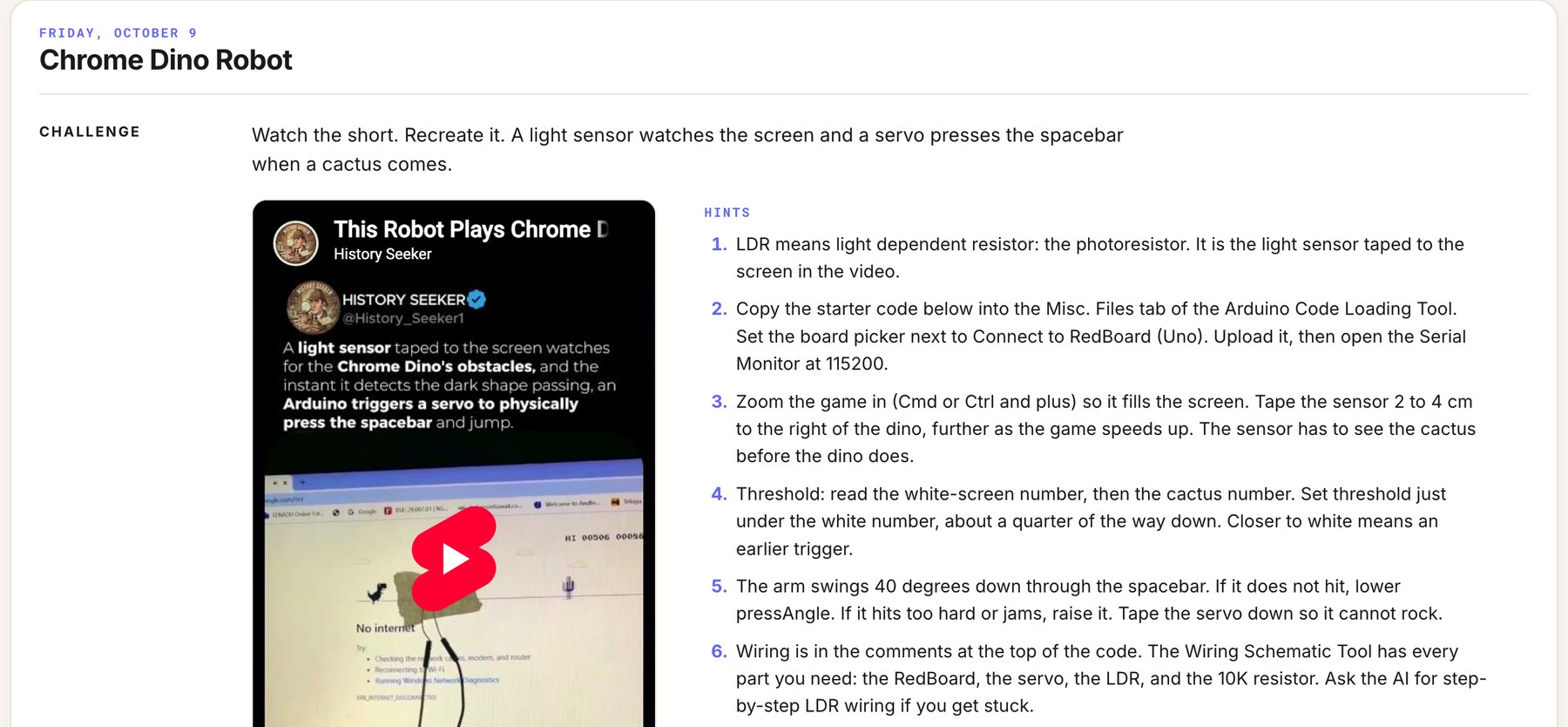 The whole brief. Watch the short, recreate it, here are six hints.
What I was actually after
Here is the part I did not tell them. That silly robot needs four things nobody in the room had ever done:
- Wire a servo motor. Three wires, unlabeled, and the colors change from servo to servo. Some are brown, red, orange. Some are black, red, white. The light one is always the signal.
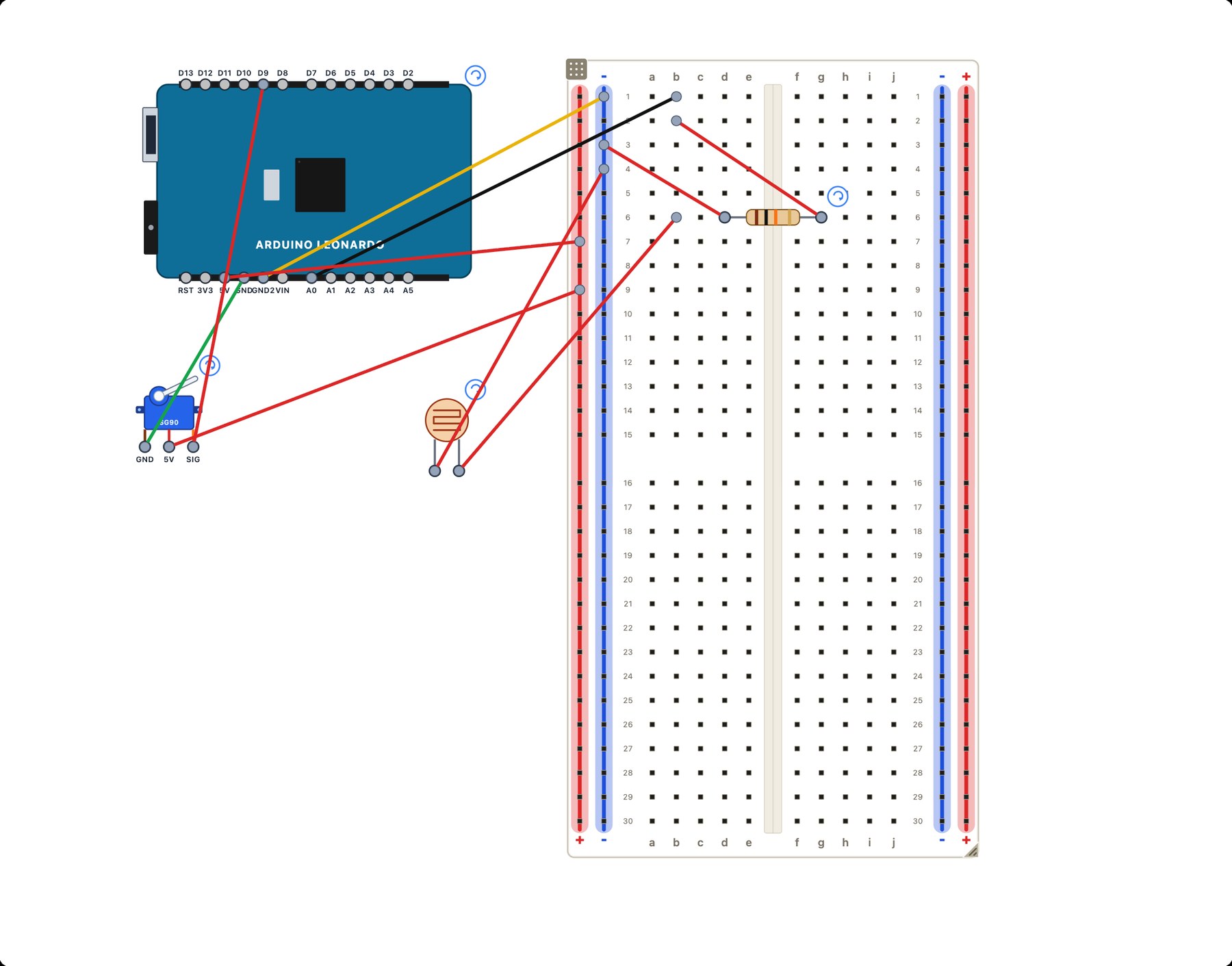
- Wire an LDR, a light dependent resistor, which only works as a sensor if you pair it with a second resistor to make a voltage divider.
- Read an analog pin. Every input this class had built so far was digital: on or off. A photoresistor gives you a number from 0 to 1023, and you have to decide what that number means.
- Use the Serial Monitor to set a threshold. Read the number on a white screen, read the number when the cactus goes by, pick a line between them, and change the code by hand.
That last one is the real hidden agenda. Soon these same students start Project 3, where they add a breath pressure sensor to a hands-free controller. That sensor is also a stream of numbers. Calibrating it means staring at the Serial Monitor, finding the resting value, the puff value, and the sip value, and writing the triggers yourself. Nobody feels comfortable doing that the first time, so I wanted their first time to be on a dinosaur.
Simple is not the same as easy
On paper this is a one-line idea: if the sensor sees dark, press the key. In practice it was the hardest thing we have done all year, and every team hit a different wall.
The resistor was the big one. Students had used resistors to protect LEDs, but this was the first time a resistor was doing something less visible: turning an LDR into a voltage divider. Without the 10K path from A0 to ground, the sensor cannot produce a useful reading. The quickest way to make that clear was to let the circuit fail, then add the resistor and watch the numbers change.
The servo was the second. Three unlabeled pins look exactly like the IR sensor they wired in Project 2, which was a nice bridge, except the order is different and the colors lie. Some servos also behave differently from others at the same angle, which is a lesson in itself.
Then the subtle stuff. One student figured out that a delay() anywhere in the loop makes the robot blind for that many milliseconds, so the cactus walks right past the sensor. Another team realized the sensor has to sit in front of the dinosaur, not on it, because the robot needs to see the cactus before the dinosaur does.
My favorite moment: two students got stuck because the cactus was too light a gray for their sensor to notice. They had recently learned to vibe code an app in Gemini, so they built their own version of the game with a slower speed and giant, pitch-black obstacles. They did not change the robot. They changed the world the robot lives in.
The submission asks for three things: code, a wiring diagram, and a video of the robot in action. Together they are worth 5 points, all or nothing. The award is a homework pass, but the real payoff was getting a servo, a voltage divider, and a threshold working in one class period. None of that was on the board when they walked in.
Why I think this matters
This class is built on a specific idea: things that look simple are usually hard, and people whose abilities are underestimated can do a lot once the tool fits them. A dinosaur robot is the first half of that sentence. It looks like a toy. It took a whole period of real engineering, and it taught the exact skill set Project 3 depends on, without any of the weight of designing for a real person yet.
I have written before about building the tool instead of finding it. Friday was a reminder that sometimes the step back, the thing that seems like a detour, is what makes the meaningful work possible.
I honestly don't know what the servo does to the rest of the semester. A few students are already asking whether a breath sensor could drive a servo, and whether a servo could move a different sensor to a new spot so it picks up a different reading. That is not in the curriculum. It might be now.
Keep reading
New writing, when there is something worth sharing.
Notes on curiosity, inquiry, science teaching, and building the lesson.
No spam. Unsubscribe anytime. Prefer RSS?
Related reading
Building the T4SG Class Hub
How I used vibe coding to build one home for my Tech for Social Good class: a connected, cumulative assistive technology project where every artifact is made by a student, for a real person's goal.
Read →Making the Lesson, Not Planning It
A month ago I wrote about how the app is the lesson. This week I crossed a quieter threshold. I am no longer building apps as enrichment, or as a special-occasion tool. I am building them instead of..
Read →Build the Tool, Don't Find the Tool
A student in my neuroscience class blinked. A lot. That's not remarkable in itself, we all blink. What was remarkable was the question that followed: How many times do we blink in a minute? And...
Read →